
Delete tweets safely
Delete tweets locally on Windows
A Windows app that deletes tweets, replies and reposts through your own browser session — without handing your account to a cloud service.
- Runs locally
- One-time purchase
- No subscription
- Local Windows app
- Uses your own browser session
- One-time purchase
How it works
Delete My Tweets runs on Windows and works through your own browser session.
Open the app
Launch the Windows app and enter your X username.
Sign in in your browser
The app opens your browser so you can sign in to X yourself.
Choose filters and start
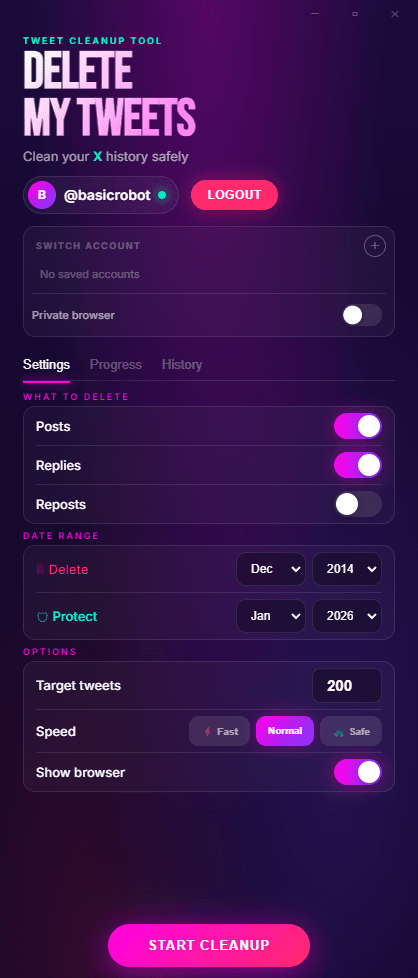
Select what to remove, set your filters, and start the deletion run.
You stay in control of the session the whole time.
Deletes tweets, replies and reposts
- Tweets
- Replies
- Reposts
Use filters to target what you want to remove.
Most Tweet Deletion Tools Are Cloud Services
Many tweet deletion tools ask you to grant account access so a cloud service can process deletions for you.
Delete My Tweets Works Differently
Delete My Tweets runs locally on your Windows computer through your own browser session. No cloud service performs the deletions.
Frequently Asked Questions
High-intent answers on safety, deletion through your own browser session, pricing, and support.
Is Delete My Tweets a cloud service?
No. Tweet deletion runs locally on your Windows computer through your own browser session. It is not handed off to a cloud service.
Does it store my Twitter login?
No. You sign into X in your own browser session. Delete My Tweets does not store login credentials or OAuth tokens for deletion.
Is it safer than cloud services?
Cloud services operate on remote infrastructure and often store account access tokens. Delete My Tweets removes that deletion layer by running locally through your own browser session.
Do I need API access to use it?
No. No API keys or stored OAuth tokens are required for deletion. It runs through your own browser session on your own Windows computer.
Is there a tweet delete app that works locally?
Yes. Delete My Tweets is a Windows app. The deletion workflow runs locally on your Windows computer through your own browser session instead of through a cloud service, and the product is sold as a one-time purchase.
How does Delete My Tweets work technically?
You authenticate directly with X in your browser, choose tweets, replies, or reposts, and run the process locally through your own browser session. No API keys or stored OAuth tokens are required for deletion. No cloud service performs the deletions.
Can I delete tweets from specific years or date ranges?
Yes. Delete My Tweets supports date filters so you can target a specific year, a specific range, or your full history.
Can I delete replies and reposts too?
Yes. You can remove tweets, replies, and reposts with one local workflow.
How long does it take to delete thousands of tweets?
It depends on account size and X rate behavior. Hundreds can take minutes; larger histories can take hours. The app is built for long, unattended runs.
Is Delete My Tweets a subscription?
No. Delete My Tweets is a one-time purchase with no recurring subscription required.
What data do you process after purchase?
Checkout is handled by Stripe. We receive your purchase email and confirmation that payment succeeded so we can deliver your license, support the order, and handle refunds. License checks use the license key and the related purchase record rather than your deletion data. Tweet deletion data stays local to your device.
Features
A plain summary of what the Windows app supports.
Runs Automatically
Start the deletion, then let the app run through the selected items.
Runs Locally
Deletion runs locally on your Windows computer through your own browser session. No cloud service performs the deletions.
Filtering
Filter by date range, keyword, or deletion type.
Tweets, Replies, and Reposts
Delete tweets, replies, and reposts together, or focus on one deletion type at a time.
One-Time Purchase
Pay once. No subscription or recurring fee.
Simple Pricing
One price. One purchase. No subscription or hidden fees.
One-Time License
Pay once, keep it forever
30-day money-back guarantee. No questions asked.
Checkout is handled by Stripe. We receive your purchase email and confirmation that payment succeeded so we can deliver your license, support the order, and handle refunds. Tweet deletion itself stays local to your Windows computer.
Before you buy
Deletion takes time. Hundreds of tweets: under an hour. Thousands: several hours. 10,000+: all day or overnight. The app runs hands-free in the background - start it and walk away. Keep your browser open and computer awake for long runs.
What People Are Saying
“I did not want to hand account access to a cloud service. The local workflow is why I bought it.”
Amy
“I was job searching and wanted my timeline cleaned up before interviews. I let it run overnight and woke up to a much cleaner account.”
London
“I went from roughly 11,000 tweets to 2,000 over one weekend. Slow, but reliable.”
Marcus T.
“Simple, clear, and no subscription upsell. Bought it, ran it, done.”
Delete Tweets, Replies, and Reposts Through Your Own Browser Session.
Delete My Tweets is a Windows app that runs locally on your computer. No cloud service performs the deletions.